This issue has been observed when using the Safari browser.

Safari’s privacy features (especially cross-site tracking prevention and cookie blocking) can prevent SCORM packages from properly communicating completion data back to Moodle. As a result, even though the learner finishes the module, Moodle does not receive the completion signal.
Primary Solutions
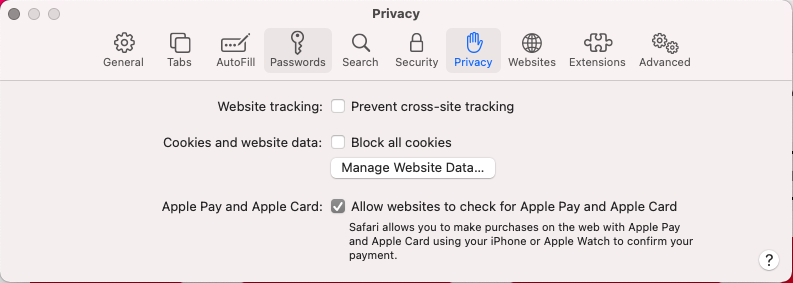
Option 1: Adjust Safari Settings (Recommended if continuing to use Safari)
Open Safari Settings
Go to Privacy
Turn off:
Prevent Cross-Site Tracking
Block All Cookies
Close Safari completely.
Reopen Safari and relaunch the module.
Complete the module again and click “Exit Activity.”
Option 2: Use a Different Browser (Preferred Solution)
We recommend switching to Google Chrome when completing Moodle SCORM modules.
Steps:
Install Google Chrome via the app store
Open Google Chrome, log into Moodle and complete a module.
Click “Exit Activity.”
If you run into any issues, then please contact us
Chrome generally provides more consistent SCORM tracking compatibility.
Option 3: Turn off privacy/adblocker plugins
Ad blockers
Privacy extensions
Script blockers
These can block SCORM communication scripts.